MCP — Model Context Protocol
The open standard that lets any tool connect to any model — build your own MCP server.
What you'll learn
Why MCP Exists
The problem: every app had its own tool integration format
Before MCP, integrating tools with AI models was bespoke work. Want Claude to search the web? Write a custom tool definition and handler. Want it to read from Notion? Another custom integration. Want it to query your database? Yet another. Every tool provider implemented their own format, and every AI application wrote their own integration layer. The result was an M-times-N integration matrix: M tool providers times N AI applications, each requiring a unique adapter.
MCP as the "USB-C of AI tools" — one protocol for all integrations
The Model Context Protocol (MCP) solves this with a standard protocol. Instead of N custom integrations, tool providers build one MCP server, and AI applications build one MCP client. Any client can connect to any server. The analogy is USB-C: before it, every device had its own cable. After it, one cable works for everything. MCP is that cable for AI tool integrations.
Who defines MCP: Anthropic open standard, growing ecosystem
MCP was created by Anthropic as an open standard. The specification, SDKs, and reference implementations are all open source. While Anthropic initiated it, MCP is designed to work with any AI model — not just Claude. The ecosystem is growing rapidly, with MCP servers available for databases, search engines, code repositories, productivity tools, and more.
Current adoption: Claude Desktop, Claude Code, and growing list of MCP-compatible hosts
MCP is already integrated into Claude Desktop (connect local MCP servers to Claude), Claude Code (the CLI agent tool you may be using right now), Cursor, and other development environments. The list of MCP-compatible hosts is expanding as the standard gains adoption across the AI developer ecosystem.
MCP Architecture
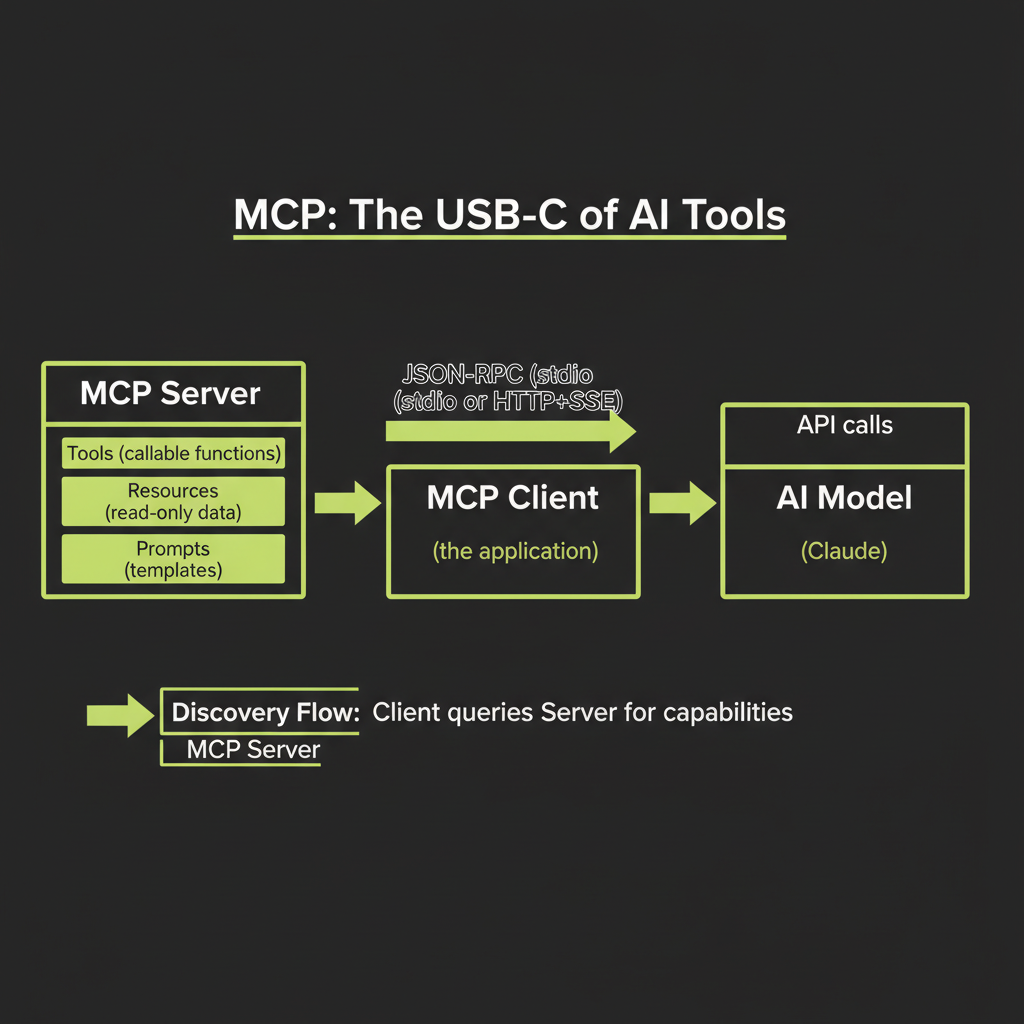
MCP Server: exposes Tools, Resources, and Prompts
An MCP server exposes three types of capabilities to clients:
- Tools — Functions the model can call. These are the same concept as Claude's native tool calling (from Module 7), but exposed through a standard protocol. A tool has a name, description, input schema, and a handler that executes the function.
- Resources — Data the model can read. Resources are read-only: database records, file contents, API responses, configuration data. They provide context to the model without requiring the model to "call" anything.
- Prompts — Reusable prompt templates. The server can provide pre-built instructions for common tasks, giving the model ready-made workflows that the server author has optimized.
MCP Client: application that discovers and uses server capabilities
The MCP client is your application — the software that connects to MCP servers, discovers their capabilities, and presents them to the AI model. The client handles the communication protocol, capability discovery, and request routing. When the model decides to use a tool, the client routes the request to the appropriate server.
Communication: JSON-RPC over stdio or Streamable HTTP
MCP uses JSON-RPC 2.0 as its message format. The transport layer supports two modes:
- stdio transport: The server runs as a local process, and the client communicates via standard input/output. This is the simplest setup — ideal for local development and tools that run on your machine.
- Streamable HTTP transport: The server runs as a web service, exposing a single HTTP endpoint. Clients send JSON-RPC requests via POST, and the server can optionally upgrade responses to SSE streams for long-running operations. This enables remote MCP servers that multiple clients can share.
Start with stdio transport for local development. It requires zero networking setup — the server is just a process on your machine. Move to HTTP transport when you need to share the server across multiple applications or deploy it remotely.
Discovery: client queries server for available capabilities
When a client connects to an MCP server, the first thing it does is discover what the server offers. The client sends a request, and the server responds with its list of tools, resources, and prompts — including names, descriptions, and schemas. This is how the client (and by extension, the model) knows what capabilities are available.
Execution: model calls tool → client routes to server → server executes → result returned
The execution flow mirrors the tool calling pattern from Module 7, with MCP as the communication layer:
1. Model decides to call a tool (tool_use)
2. Client identifies which MCP server owns that tool
3. Client sends JSON-RPC request to the server
4. Server executes the tool handler
5. Server returns the result via JSON-RPC response
6. Client packages result as tool_result for the model
7. Model processes the result and continues
Building a TypeScript MCP Server
Using @modelcontextprotocol/sdk
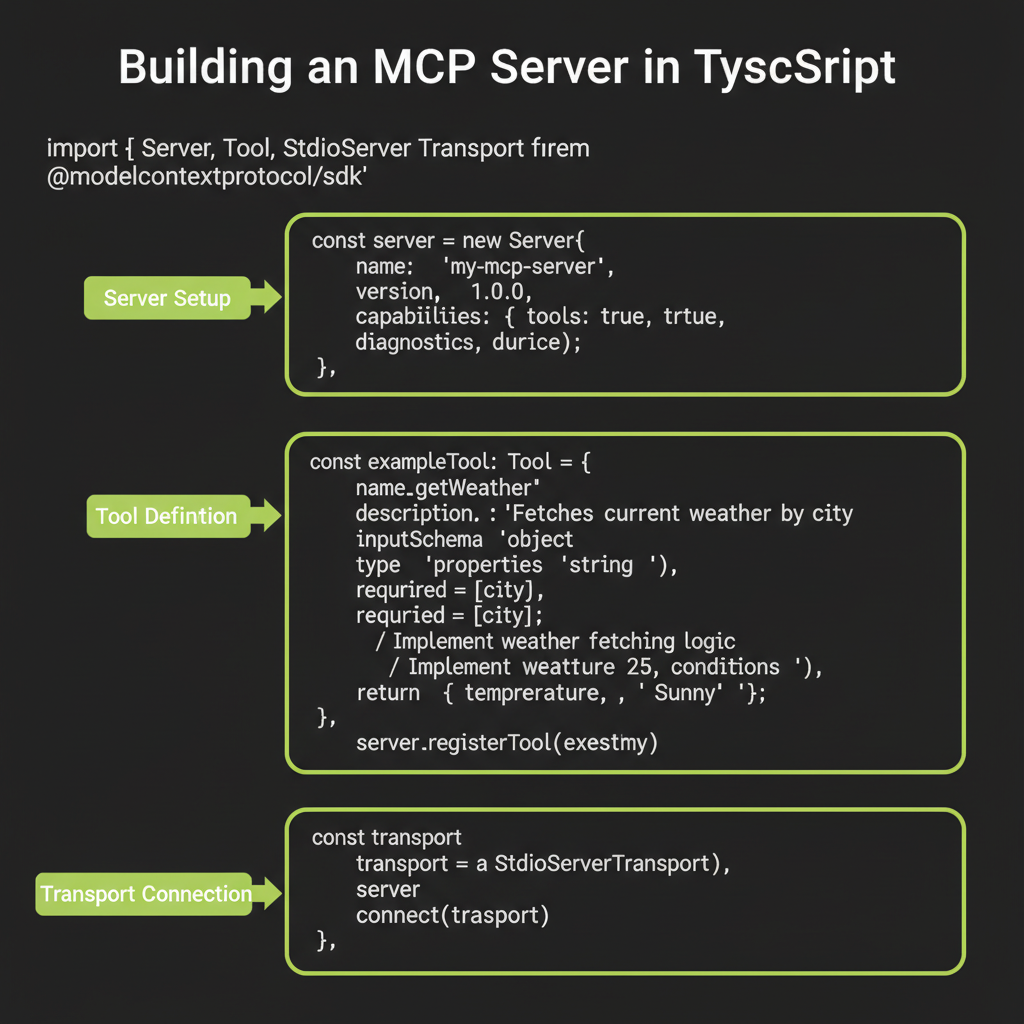
The official MCP SDK for TypeScript provides the building blocks for both servers and clients. Install it as a dependency:
npm install @modelcontextprotocol/sdkServer setup: name, version, capabilities
Create a server instance with a name and version. The capabilities object declares what your server offers:
import { McpServer } from "@modelcontextprotocol/sdk/server/mcp.js";
import { StdioServerTransport } from "@modelcontextprotocol/sdk/server/stdio.js";

const server = new McpServer({
  name: "my-tools",
  version: "1.0.0",
});
Defining a tool: name, description, inputSchema, handler function
Register tools with the server. Each tool has a name, description, input schema (using Zod), and a handler function:
import { z } from "zod";

server.tool(
  "get_weather",
  "Get current weather for a city. Use when the user asks about weather conditions.",
  { city: z.string().describe("City name, e.g. 'Tokyo'") },
  async ({ city }) => {
    const response = await fetch(
      `https://api.weather.example.com/current?city=${city}`
    );
    const data = await response.json();
    return {
      content: [
        {
          type: "text",
          text: JSON.stringify({
            temperature: data.temp,
            condition: data.condition,
            humidity: data.humidity,
          }),
        },
      ],
    };
  }
);

server.tool(
  "calculate",
  "Evaluate a math expression. Use for calculations, conversions, and numeric analysis.",
  { expression: z.string().describe("Math expression, e.g. '(4 * 12) + 7'") },
  async ({ expression }) => {
    try {
      const result = Function(`"use strict"; return (${expression})`)();
      return {
        content: [{ type: "text", text: String(result) }],
      };
    } catch {
      return {
        content: [{ type: "text", text: "Error: invalid expression" }],
        isError: true,
      };
    }
  }
);
Starting the server: stdio transport for local tools
const transport = new StdioServerTransport();
await server.connect(transport);
console.error("MCP server running on stdio");
That is a complete MCP server with two tools. When a client connects, it discovers both tools and can present them to an AI model. The model calls them through the standard MCP protocol — no custom integration code needed on the client side.
Testing with Claude Desktop or MCP Inspector
To test your MCP server locally, add it to your Claude Desktop configuration (in claude_desktop_config.json) or use the MCP Inspector tool that comes with the SDK. The Inspector lets you connect to your server, list its capabilities, and call tools interactively without involving an AI model.
Convex as an MCP Server
Why Convex is a natural MCP server
Convex queries and mutations are already callable functions with typed schemas. They have names, input validation, and return structured data. Wrapping them as MCP tools is a natural fit — you are essentially exposing your existing backend functions through a standard protocol.
Convex as an MCP server is an emerging pattern. The ecosystem is evolving rapidly — expect the integration APIs and best practices to mature over time. The core concept is stable: expose Convex functions through MCP's standard protocol.
Exposing Convex queries as MCP resources
Convex queries (read-only functions) map naturally to MCP resources. A query that returns a list of notes becomes an MCP resource that models can read without side effects:
// Conceptual: Convex queries as MCP resources
const mcp = new McpServer(components.mcp, {
  resources: {
    listNotes: {
      handler: api.notes.list,
      description: "List all saved notes",
    },
    getNote: {
      handler: api.notes.getById,
      description: "Get a specific note by ID",
    },
  },
});
Exposing Convex mutations as MCP tools
Convex mutations (write operations) map to MCP tools — functions that the model can call to take actions:
// Conceptual: Convex mutations as MCP tools
const mcp = new McpServer(components.mcp, {
  tools: {
    createNote: {
      handler: api.notes.create,
      description: "Create a new note with title and content",
    },
    searchNotes: {
      handler: api.notes.search,
      description: "Search notes by keyword",
    },
  },
});
Authentication: connecting MCP server credentials to Convex auth
When an external AI tool connects to your Convex MCP server, it needs authentication. The MCP server must validate credentials and map them to Convex user identities. This ensures that external models only access data the connecting user is authorized to see — maintaining the same security boundaries as your regular application.
MCP vs Native Tool Calling
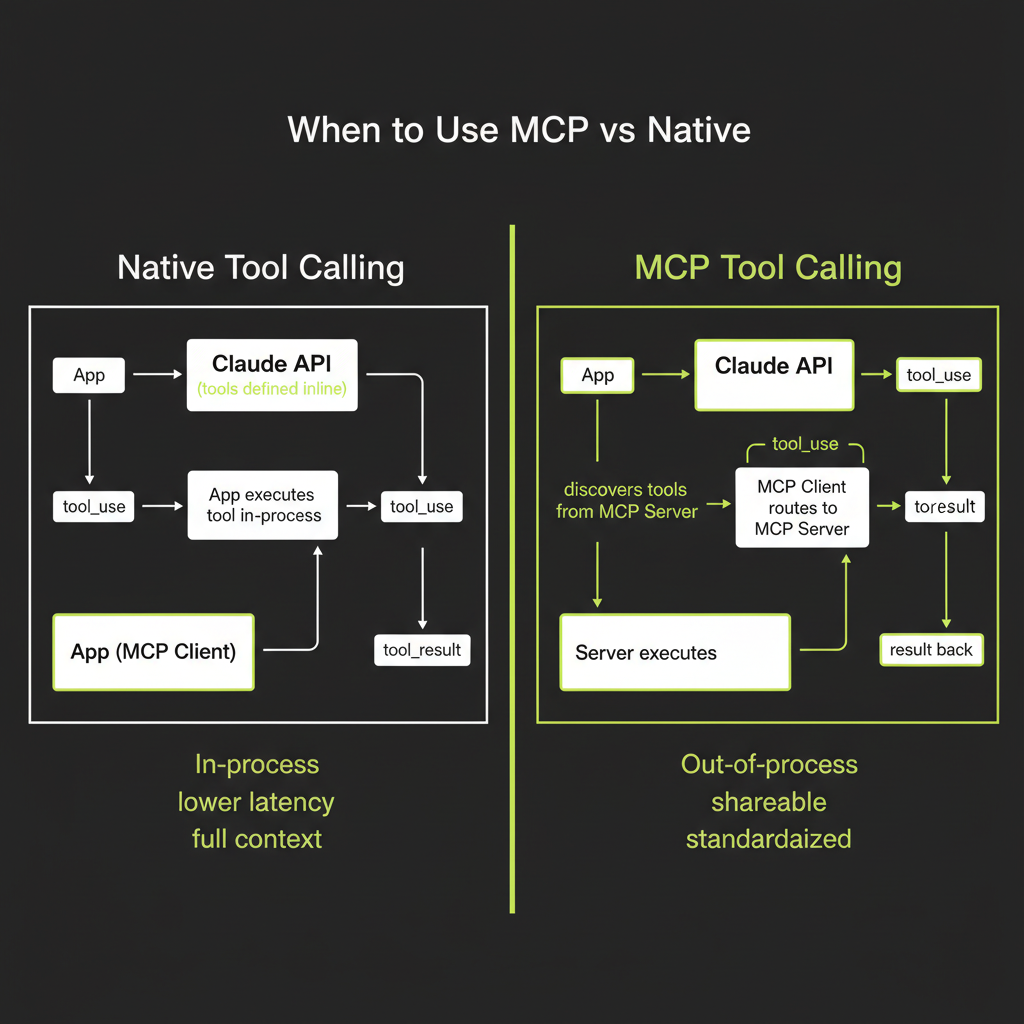
Native tool calling: in-process, lower latency, full Convex context
The tool calling you built in Module 7 is native: tools run in the same process as your application, have direct access to the Convex runtime context, and execute with minimal overhead. Latency is low because there is no inter-process communication. You have full access to ctx.runQuery(), ctx.runMutation(), and all Convex features.
MCP: out-of-process, shareable across apps, standardized discovery
MCP tools run in a separate process (the MCP server). The client and server communicate over stdio or HTTP, which adds latency. But MCP provides something native calling does not: standardization and shareability. An MCP server can be used by Claude Desktop, Claude Code, Cursor, or any MCP-compatible client without modification.
When MCP adds value
- Reusing tools across multiple applications: If you want the same tools available in your web app, in Claude Desktop, and in your CI pipeline, build one MCP server instead of three native integrations.
- Exposing tools to external clients: If partners or users need to connect their AI tools to your backend, MCP provides a standard interface.
- Leveraging the MCP ecosystem: Hundreds of pre-built MCP servers exist for databases, search engines, productivity tools, and developer services. Using MCP means you can plug into this ecosystem instead of building custom integrations.
When native is better
- Single-app internal tools: If the tools are only used within one application and will not be shared, native calling is simpler and faster.
- Low-latency requirements: MCP adds inter-process communication overhead. For real-time applications where tool execution latency matters, native calling wins.
- Deep Convex integration: When tools need rich interaction with Convex internals (reactive queries, real-time subscriptions, complex transaction chains), native calling provides direct access that MCP cannot match.
Use native tool calling for tools that are internal to your application. Use MCP when you need to share tools across multiple applications or expose them to external AI clients. Most projects will use both — native for core functionality, MCP for interoperability.