RAG Systems
Give your LLM the right context at the right time — build a production-quality retrieval pipeline.
What you'll learn
The Core Problem: LLMs Are Smart But Uninformed
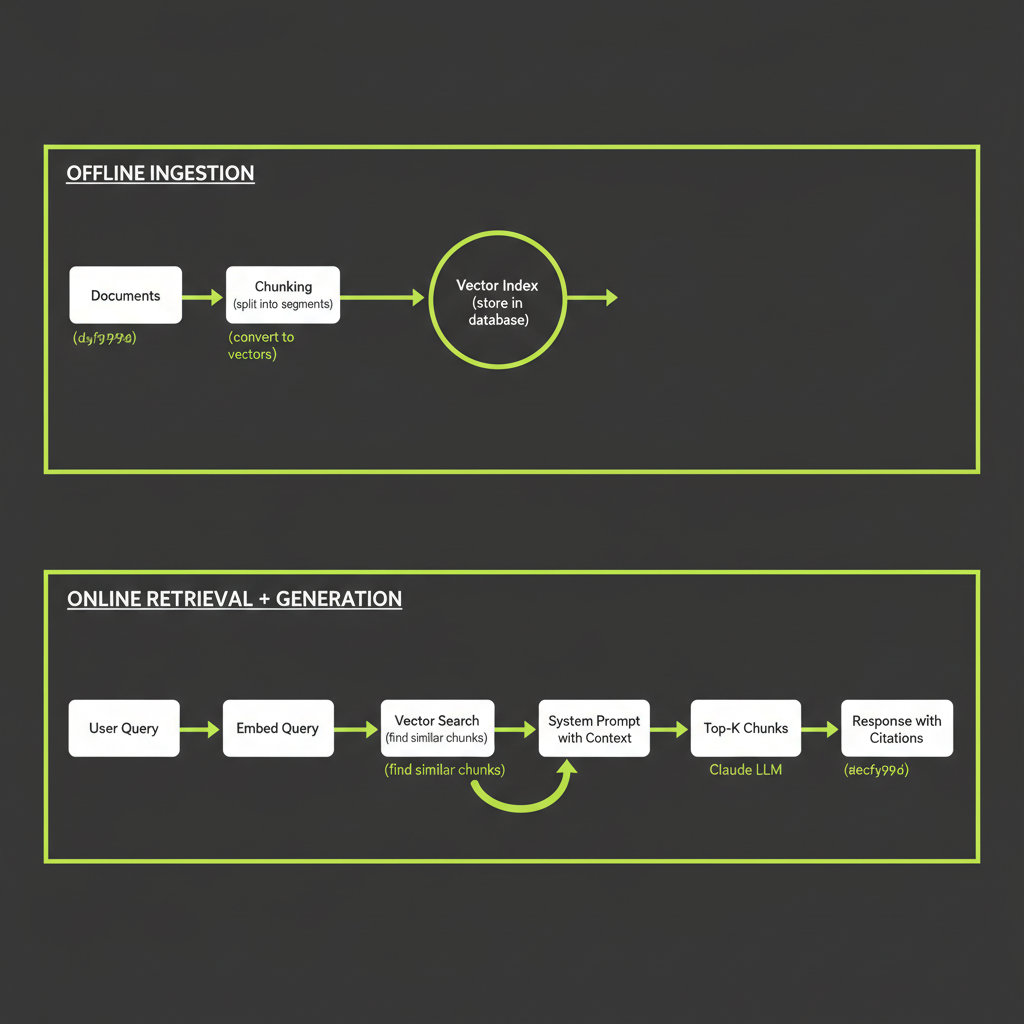
Your LLM is smart but uninformed. RAG gives it the right context at the right time. This is the most important pattern you will learn in this course — it transforms Claude from a general-purpose assistant into a domain expert for your specific application.
What a base Claude knows (and does not know)
Claude's knowledge comes from its training data, which has a fixed cutoff date. It knows an enormous amount about the world up to that point, but it does not know about your company's internal documentation, your product's latest release, the support ticket that came in this morning, or any proprietary information that was not in the training corpus.
Three problems surface immediately when you try to use a raw LLM for domain-specific tasks:
- Knowledge cutoff: The model cannot answer questions about events or changes after its training data ends.
- Hallucination: When Claude does not have the answer, it sometimes generates plausible-sounding nonsense. For customer support, legal advice, or medical information, this is unacceptable.
- Context limits: Even with 200K-token context windows, you cannot stuff every document into the prompt. It is expensive, slow, and produces worse results than focused retrieval.
What RAG adds
Retrieval-Augmented Generation solves all three problems. Instead of relying on the model's training data, you retrieve relevant documents at query time and inject them into the prompt. The model generates its answer grounded in real, current, domain-specific data.
Stage 1 — Ingestion and Chunking
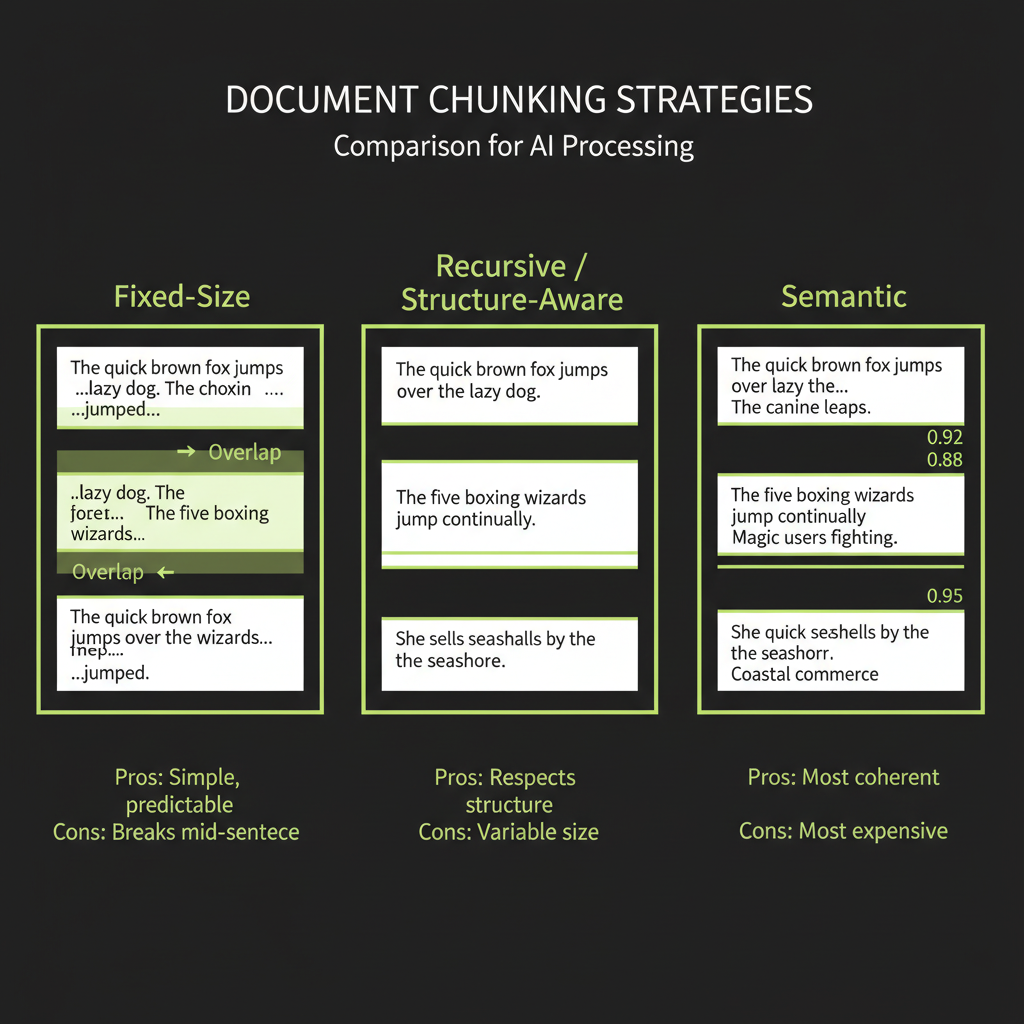
The quality of your RAG system is determined before you ever call Claude. It is determined by how you chunk and what you embed. Get chunking wrong, and even perfect retrieval will return irrelevant context.
Why chunking matters
You cannot embed an entire 10-page document and get useful search results. A long returns policy contains dozens of topics — shipping windows, refund methods, exceptions, international orders. If you embed the whole document as one vector, it becomes a blurry average of all those topics and matches poorly against specific queries.
Chunking splits documents into focused passages so that each embedding represents a specific piece of information that can be precisely retrieved.
Fixed-size chunking
The simplest approach: split text every N characters (or tokens), with optional overlap between consecutive chunks.
function fixedSizeChunk(text: string, size: number, overlap: number = 0): string[] {
  const chunks: string[] = [];
  let start = 0;
  while (start < text.length) {
    chunks.push(text.slice(start, start + size));
    start += size - overlap;
  }
  return chunks;
}

// Each chunk is ~500 chars, with 50 chars of overlap
const chunks = fixedSizeChunk(document, 500, 50);
Pros: Dead simple, predictable chunk sizes, easy to implement. Cons: Splits mid-sentence, mid-paragraph, even mid-word. Loses context at boundaries. Use this as a starting baseline, not a production strategy.
Recursive / structure-aware chunking
Split on natural boundaries — paragraphs first, then sentences, then characters — respecting the document's structure:
function recursiveChunk(text: string, maxSize: number): string[] {
  const separators = ["\n\n", "\n", ". ", " "];

  for (const sep of separators) {
    const parts = text.split(sep);
    if (parts.some((p) => p.length <= maxSize)) {
      const chunks: string[] = [];
      let current = "";

      for (const part of parts) {
        const candidate = current ? current + sep + part : part;
        if (candidate.length > maxSize && current) {
          chunks.push(current);
          current = part;
        } else {
          current = candidate;
        }
      }
      if (current) chunks.push(current);

      return chunks.flatMap((chunk) =>
        chunk.length > maxSize ? recursiveChunk(chunk, maxSize) : [chunk]
      );
    }
  }

  return fixedSizeChunk(text, maxSize);
}
Pros: Respects document structure, keeps related sentences together, produces semantically coherent chunks. Cons: Variable chunk sizes, slightly more complex implementation. This is the recommended default for most RAG systems.
Semantic chunking
Group sentences by meaning: compute embeddings for each sentence and split where the cosine similarity between consecutive sentences drops below a threshold.
// Pseudocode — demonstrates the concept
function semanticChunk(
  sentences: string[],
  embeddings: number[][]
): string[][] {
  const groups: string[][] = [[]];

  for (let i = 0; i < sentences.length; i++) {
    if (i > 0) {
      const similarity = cosineSimilarity(embeddings[i], embeddings[i - 1]);
      if (similarity < 0.75) {
        // Topic shift detected — start a new chunk
        groups.push([]);
      }
    }
    groups[groups.length - 1].push(sentences[i]);
  }

  return groups;
}
Pros: Chunks are semantically coherent — each one is about one topic. Cons: Requires embedding every sentence (expensive), threshold tuning is finicky, and the results are not always reproducible.
Overlap strategies
Regardless of chunking strategy, adding overlap between consecutive chunks prevents information loss at boundaries. A 20% overlap is the common starting point — for 500-character chunks, that means 100 characters of overlap. This ensures that sentences split across chunk boundaries appear in at least one complete chunk.
Stage 2 — Embeddings
What an embedding is
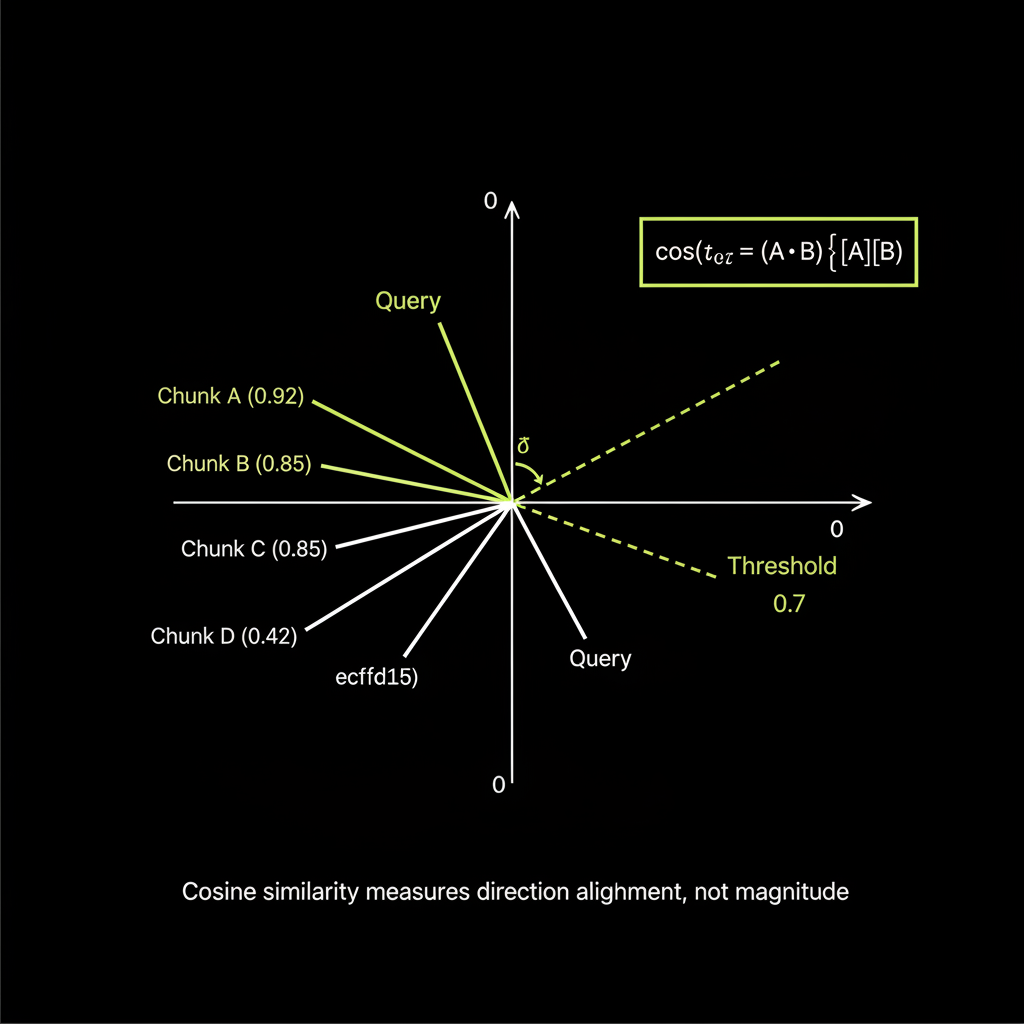
An embedding is a vector that encodes semantic meaning. An embedding model reads a chunk of text and outputs a list of floating-point numbers (typically 1,024 to 3,072 dimensions) that captures the passage's meaning. Two passages about the same topic produce vectors that are close together in this high-dimensional space; passages about different topics are far apart.
"How do I return a product?"   -> [0.12, -0.34, 0.56, ...]
"What is your refund policy?"  -> [0.11, -0.32, 0.55, ...]  <- very similar!
"Where is your office?"        -> [-0.45, 0.23, 0.01, ...]  <- very different
Embedding model comparison
Model                        | Dimensions | Best For              | Notes
text-embedding-3-small       | 1536       | General purpose       | Good baseline, cheap
text-embedding-3-large       | 3072       | Higher accuracy       | 2x dims, better retrieval
embed-v4 (Cohere)            | 1024       | Multilingual          | Supports matryoshka embeddings
voyage-3 (Voyage AI) | 1024 | Code + text | Strong on technical contentAlways use the same embedding model for ingestion and retrieval. If you embed your documents with text-embedding-3-small and embed your queries with voyage-3, the vectors live in different spaces and similarity scores are meaningless. This is one of the most common RAG bugs.
Cosine similarity: how to interpret the _score field
Cosine similarity measures the angle between two vectors, producing a score from -1 (opposite) to 1 (identical). In practice, RAG retrieval scores typically range from 0.3 to 0.95:
function cosineSimilarity(a: number[], b: number[]): number {
  let dot = 0, normA = 0, normB = 0;
  for (let i = 0; i < a.length; i++) {
    dot += a[i] * b[i];
    normA += a[i] * a[i];
    normB += b[i] * b[i];
  }
  return dot / (Math.sqrt(normA) * Math.sqrt(normB));
}

// Interpretation:
// > 0.85: Highly relevant — strong semantic match
// 0.70 - 0.85: Relevant — good candidate for context
// 0.50 - 0.70: Partially relevant — may contain useful info
// < 0.50: Likely irrelevant — exclude from context
A threshold above 0.7 is a typical starting point for quality retrieval. Tune this based on your specific domain and embedding model.
Stage 3 — Vector Search with Convex
Defining a vectorIndex in Convex schema
// convex/schema.ts
import { defineSchema, defineTable } from "convex/server";
import { v } from "convex/values";

export default defineSchema({
  documents: defineTable({
    title: v.string(),
    content: v.string(),
    uploadedAt: v.number(),
  }),

  chunks: defineTable({
    documentId: v.id("documents"),
    text: v.string(),
    embedding: v.array(v.float64()),
    metadata: v.optional(v.object({
      source: v.string(),
      section: v.optional(v.string()),
    })),
  })
    .vectorIndex("by_embedding", {
      vectorField: "embedding",
      dimensions: 1536,
      filterFields: ["documentId"],
    }),
});
The vectorField tells Convex which field contains the embedding vector. The dimensions must match your embedding model's output size (1536 for text-embedding-3-small). The filterFields let you scope searches to specific documents.
ctx.vectorSearch() with limit and filter
Vector search in Convex happens in actions (not queries), because you typically need to call an external embedding API to embed the query first:
// convex/search.ts
import { action } from "./_generated/server";
import { v } from "convex/values";
import { internal } from "./_generated/api";

export const searchChunks = action({
  args: { query: v.string() },
  handler: async (ctx, args) => {
    // 1. Embed the query using the same model as ingestion
    const queryEmbedding = await embedText(args.query);

    // 2. Vector search — returns results sorted by similarity
    const results = await ctx.vectorSearch("chunks", "by_embedding", {
      vector: queryEmbedding,
      limit: 5,
    });

    // 3. Fetch full chunk documents with scores
    const chunks = await Promise.all(
      results.map(async (result) => {
        const chunk = await ctx.runQuery(internal.chunks.getById, {
          id: result._id,
        });
        return { ...chunk, score: result._score };
      })
    );

    return chunks;
  },
});
Hybrid search: combining vector search with BM25
Pure vector search has a weakness: it can miss exact keyword matches. If your documentation mentions "SKU-12345" and the user asks about "SKU-12345," vector search might not surface it because embeddings capture meaning, not exact strings.
Hybrid search combines vector search with full-text search (BM25). The @convex-dev/rag component does this automatically — it runs both searches and merges results using reciprocal rank fusion. This is one of the biggest advantages of using a battle-tested component rather than building from scratch.
Stage 4 — Generation with Retrieved Context
The RAG system prompt pattern
const systemPrompt = `You are a helpful support agent for Acme Corp.
Answer the user's question using ONLY the information in <context>.
If the context does not contain enough information to answer,
say exactly: "I don't have information about that in our documentation."
Do not use your general knowledge to fill gaps.

<context>
${retrievedChunks.map((c) => c.text).join("\n\n---\n\n")}
</context>`;

const response = await anthropic.messages.create({
  model: "claude-sonnet-4-6",
  max_tokens: 1024,
  system: systemPrompt,
  messages: [{ role: "user", content: userQuestion }],
});
Citation generation
Make answers verifiable by instructing the model to cite which chunks it used:
const systemPrompt = `Answer using the provided sources.
After each claim, cite the source in brackets like [Source 1].

<sources>
${chunks.map((c, i) =>
  `<source id="${i + 1}" title="${c.title}">\n${c.text}\n</source>`
).join("\n")}
</sources>

If no source supports the answer, say "I could not find this in our docs."`;
Handling "I don't know" gracefully
The grounding constraint — "answer using ONLY the provided context" — is the single most important instruction in a RAG system prompt. Without it, the model will fill gaps with training data, producing confident-sounding hallucinations. With it, the model will decline to answer when the context does not contain the information, which is the correct behavior for a production system.
RAG Evaluation
The three pillars: RAGAS framework
Evaluating a RAG system requires checking three distinct things:
- Relevance (retrieval quality): Did we retrieve the right chunks? If the user asks about returns and we retrieve shipping information, the generation step is already doomed.
- Faithfulness (groundedness): Is the answer supported by the retrieved context? The model might generate a plausible answer that is not actually in the chunks — that is hallucination, even with RAG.
- Correctness (answer quality): Is the answer actually right? This requires ground truth — known correct answers to compare against.
LLM-as-Judge for RAG evaluation
async function evaluateFaithfulness(
  context: string,
  answer: string
): Promise<{ score: number; reasoning: string }> {
  const response = await anthropic.messages.create({
    model: "claude-sonnet-4-6",
    max_tokens: 512,
    messages: [{
      role: "user",
      content: `<context>${context}</context>

<answer>${answer}</answer>

Evaluate whether the answer is fully supported by the context.

Score from 0.0 to 1.0:
- 1.0: Every claim is directly supported by the context
- 0.5: Some claims are supported, others are not
- 0.0: The answer contains claims not found in the context

Respond in JSON: { "score": N, "reasoning": "..." }`
    }],
  });

  return JSON.parse(
    response.content[0].type === "text" ? response.content[0].text : "{}"
  );
}
Build Project — Customer Support Chatbot with RAG
Project overview
Your first major build project is a customer support chatbot that ingests your documentation, retrieves relevant context via vector search, and generates grounded answers using Claude. The system has zero hallucination tolerance — it must say "I don't know" rather than fabricate an answer.
Architecture
React Frontend
  ├── Document upload interface
  ├── Chat interface with message history
  ├── Citation display (which docs were used)
  └── Confidence indicator

Convex Backend
  ├── documents table (raw uploaded docs)
  ├── chunks table with vectorIndex
  ├── Ingestion action: parse → chunk → embed → store
  ├── Retrieval action: embed query → vector search → rank → top-K
  └── Generation action: system prompt + context → Claude → stream

Anthropic SDK
  └── Streaming response with grounding instructions
The key insight is the two-phase architecture: ingestion happens once (offline), while retrieval and generation happen for every user query (online). This separation means adding new documents does not require retraining anything — just re-ingest and re-embed.
Chunk the same 1,000-word document using all three strategies and compare retrieval quality.
- Choose a document — a product FAQ, returns policy, or technical documentation page.
- Apply fixed-size chunking at 500 characters with 50-character overlap.
- Apply recursive chunking at 500-character max size.
- Examine the output: Which strategy keeps related information together? Which splits mid-sentence?
- Run a test query against each set of chunks. Which strategy retrieves the most relevant chunk for your query?
Implement cosine similarity from scratch and use it to rank mock embeddings.
- Implement the function as shown in this module. Make sure to handle the zero-vector edge case.
- Create 5 mock embeddings — simple 4-dimensional vectors to keep the math traceable.
- Create a query embedding and compute similarity against all 5 chunks.
- Sort by score and verify the ranking matches your intuition about which chunks should be most similar.