LLM Controls
Master the parameters that shape every response — and develop the intuition to set them deliberately.
What you'll learn
The Text Generation Process
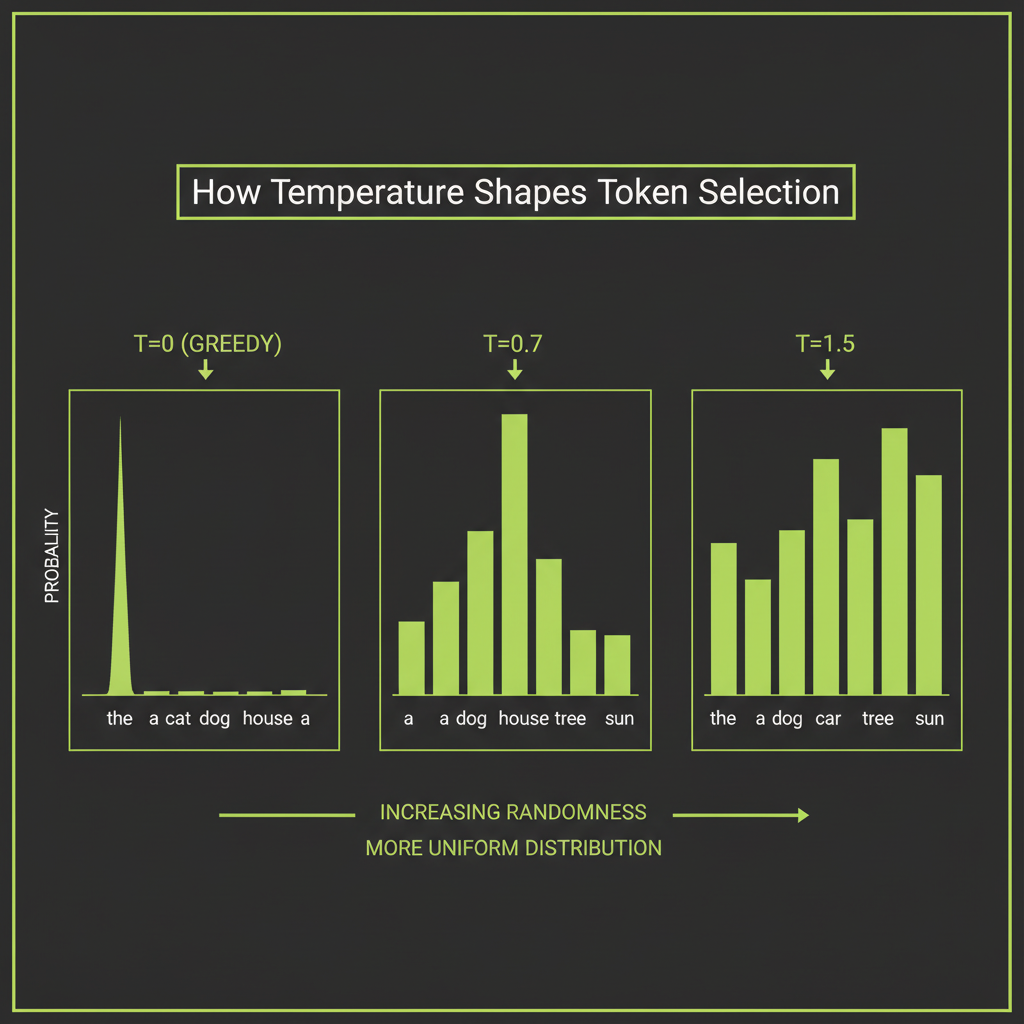
In Module 1, you learned that a transformer produces a probability distribution over its entire vocabulary for each next token. But the model does not simply pick the most probable token every time. A set of generation parameters controls how the next token is sampled from that distribution — and these parameters have a dramatic effect on the output you receive.
Understanding these controls is what separates an engineer who gets inconsistent results from one who can reliably produce the output quality their application needs.
From logits to probabilities: softmax recap
The transformer's final layer produces raw logits — one number for every token in the vocabulary. These logits are not probabilities; they can be any real number. The softmax function converts them into a probability distribution that sums to 1:
Token       | Logit  | Probability (after softmax)
"mat"       | 3.2    | 0.23
"floor"     | 2.9    | 0.18
"couch"     | 2.5    | 0.12
"table"     | 2.1    | 0.08
"roof"      | 1.8    | 0.06
... (99,995 more tokens with smaller probabilities)
The generation parameters modify this distribution before sampling, giving you precise control over the randomness and creativity of the output.
Temperature scaling
Temperature is the most important generation parameter. It scales the logits before softmax:
adjusted_logits = logits / temperatureThe effect is intuitive once you see it:
- Temperature = 0 (greedy): The distribution collapses to a single spike on the most probable token. Every run produces the same output. Use this for factual Q&A, code generation, and any task where consistency matters more than creativity.
- Temperature = 0.3–0.7: The distribution sharpens but retains some diversity. The most probable tokens dominate, but alternatives have a chance. This is the sweet spot for most production applications — structured output, analysis, general conversation.
- Temperature = 1.0: The original distribution is used as-is. Good for creative writing and brainstorming where you want the full range of the model's vocabulary.
- Temperature = 1.5+: The distribution flattens dramatically. Low-probability tokens become viable. Output often becomes incoherent. Use only for experimental purposes.
Temperature 0 is not truly deterministic — it is just highly consistent. Minor differences in floating-point computation across hardware can occasionally produce different results. If you need bit-identical reproducibility, you will need a seed parameter (available in some APIs) combined with temperature 0.
Top-k filtering
Top-k sampling restricts the candidate pool to the K most probable tokens, zeros out everything else, and renormalizes the remaining probabilities:
top_k = 40

Before: 100,000 tokens with probabilities
After:  Only the 40 most probable tokens remain, renormalized to sum to 1
Top-k prevents the model from sampling extremely unlikely tokens that would produce garbage output. The tradeoff is that a fixed K does not adapt to the shape of the distribution. For a confident prediction where only 5 tokens make sense, K=40 is too generous. For an ambiguous position where 200 tokens are reasonable, K=40 is too restrictive.
The Claude API exposes temperature and top_p but does not expose a top_k parameter. Top-k is explained here for conceptual understanding — it is used internally by many LLM inference engines, but you control Claude's sampling behavior through temperature and top-p.
Top-p (nucleus sampling)
Top-p sampling (also called nucleus sampling) is more adaptive. Instead of a fixed count, it selects the smallest set of tokens whose cumulative probability is at least P:
top_p = 0.9

Step 1: Sort tokens by probability (highest first)
Step 2: Accumulate probabilities until the sum >= 0.9
Step 3: Sample from only those tokens

Confident prediction:  5 tokens might cover 90% of probability
Ambiguous prediction: 200 tokens might be needed to reach 90%
This adaptability makes top-p the preferred sampling strategy for most use cases. It naturally expands or contracts the candidate set based on how confident the model is at each position.
How these three parameters interact
In practice, temperature, top-k, and top-p are applied together. The Claude API lets you set temperature and top-p directly:
import Anthropic from "@anthropic-ai/sdk";

const client = new Anthropic();

// Factual / deterministic
const factual = await client.messages.create({
  model: "claude-sonnet-4-6",
  max_tokens: 1024,
  temperature: 0,
  messages: [{ role: "user", content: "What is the capital of France?" }],
});

// Balanced
const balanced = await client.messages.create({
  model: "claude-sonnet-4-6",
  max_tokens: 1024,
  temperature: 0.7,
  top_p: 0.9,
  messages: [{ role: "user", content: "Write a product description for a coffee mug." }],
});

// Creative
const creative = await client.messages.create({
  model: "claude-sonnet-4-6",
  max_tokens: 1024,
  temperature: 1.0,
  top_p: 0.95,
  messages: [{ role: "user", content: "Write a poem about debugging at 3am." }],
});
A practical rule: set temperature first, then use top-p to fine-tune. Adjusting both simultaneously makes it harder to reason about the output distribution.
Tokenization in Practice
Using the Claude tokenizer to count tokens
In Module 1, you learned that LLMs process tokens, not characters. Now you need to work with tokens practically — counting them, estimating costs, and understanding why different content types have different token efficiencies.
The Anthropic SDK reports token usage in every API response:
const response = await client.messages.create({
  model: "claude-sonnet-4-6",
  max_tokens: 100,
  messages: [{ role: "user", content: "Hello, how are you?" }],
});

console.log(response.usage);
// { input_tokens: 12, output_tokens: 28 }
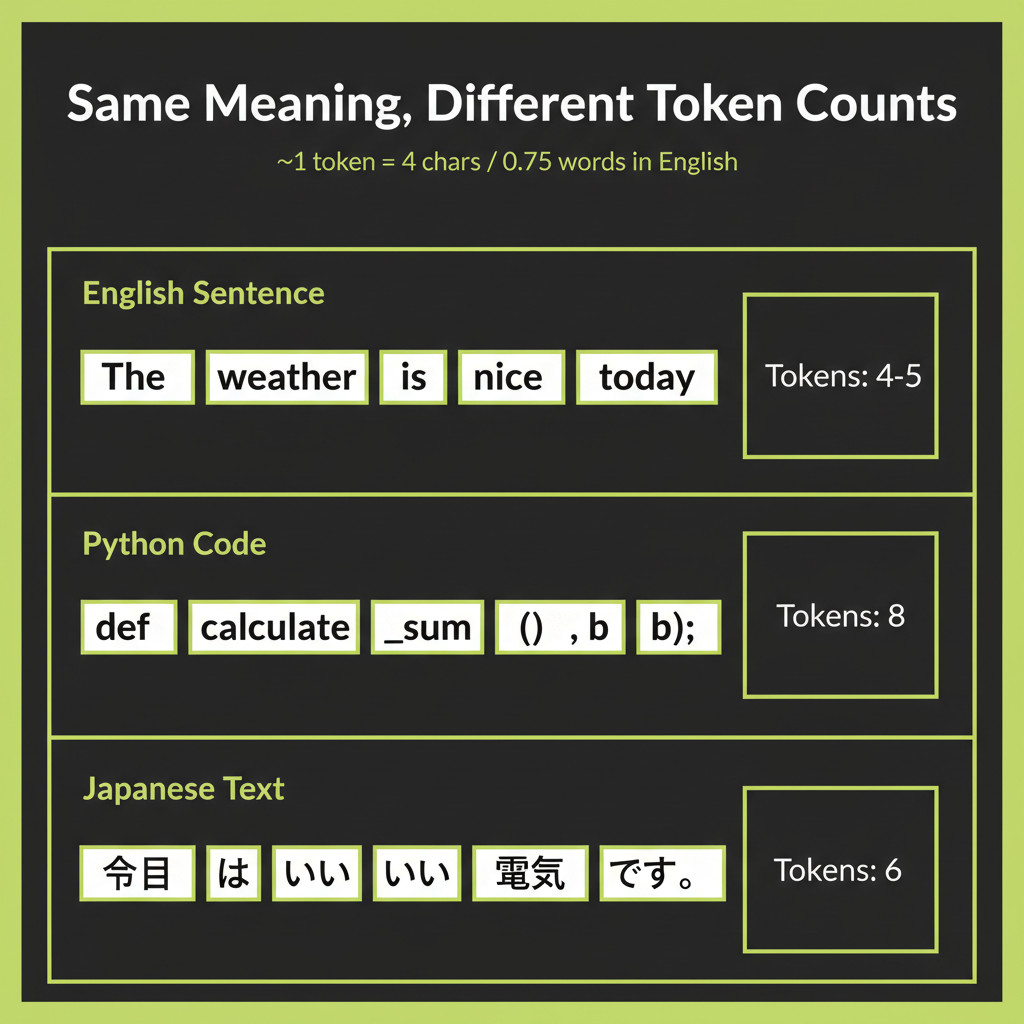
For pre-call estimation, use the ~4 characters per token rule of thumb. A 2,000-character prompt is roughly 500 tokens. This estimate is reliable for English prose but breaks down for other content types.
English vs code vs non-English comparison
Tokenization efficiency varies dramatically by content type because BPE vocabularies are trained on the distribution of the training data. English text dominates most training corpora, so it gets the most efficient encodings:
Content Type         | Example                     | Tokens | Chars/Token
English prose        | "The quick brown fox"        | 4      | 4.75
Python code          | "def get_data(self):"        | 7      | 2.71
JSON                 | '{"name": "value"}'          | 9      | 1.89
Japanese             | "AIエンジニア"                 | 4      | 2.00
Mathematical notation| "∑(i=1 to n) x²"            | 11     | 1.36
The engineering implication is direct: a Japanese prompt costs more tokens than its English equivalent carrying the same meaning. A JSON-heavy response costs more than the same information expressed in prose. When you are making thousands of API calls per day, these differences compound into significant cost differences.
Cost estimation: tokens times price per token
Claude pricing is per token, with output tokens costing more than input tokens (generation requires more computation than reading). To estimate cost:
function estimateCost(
  inputTokens: number,
  outputTokens: number,
  model: "haiku" | "sonnet" | "opus"
): number {
  const pricing = {
    haiku:  { input: 0.25,  output: 1.25  }, // per million tokens
    sonnet: { input: 3.00,  output: 15.00 },
    opus:   { input: 15.00, output: 75.00 },
  };

  const p = pricing[model];
  return (inputTokens * p.input + outputTokens * p.output) / 1_000_000;
}

// Example: 500-word prompt (~375 tokens) + 200-word response (~150 tokens)
const cost = estimateCost(375, 150, "sonnet");
// ~$0.0034 per call — about $3.40 per 1,000 callsThe prices above are illustrative and will become outdated as models and pricing evolve. Always check docs.anthropic.com/pricing for current rates before building cost estimates into production systems.
What max_tokens controls
The max_tokens parameter sets a ceiling on the number of tokens the model can generate in its response. It does not control the context window. The context window is the total capacity for input + output tokens combined, and it is fixed by the model (200K tokens for Claude Sonnet). Setting max_tokens: 1024 means the response will be cut off at 1,024 tokens even if the model has more to say. Setting it too low truncates useful output; setting it too high wastes money if the model generates a long response you do not need.
Model Selection Decision Framework
This framework addresses Coverage Gap #6 from the course analysis — model selection decision-making was identified as a critical skill that learners need but that is rarely taught explicitly. The goal is to build a mental model, not memorize specs that change with each release.
Claude model tiers: Haiku vs Sonnet vs Opus
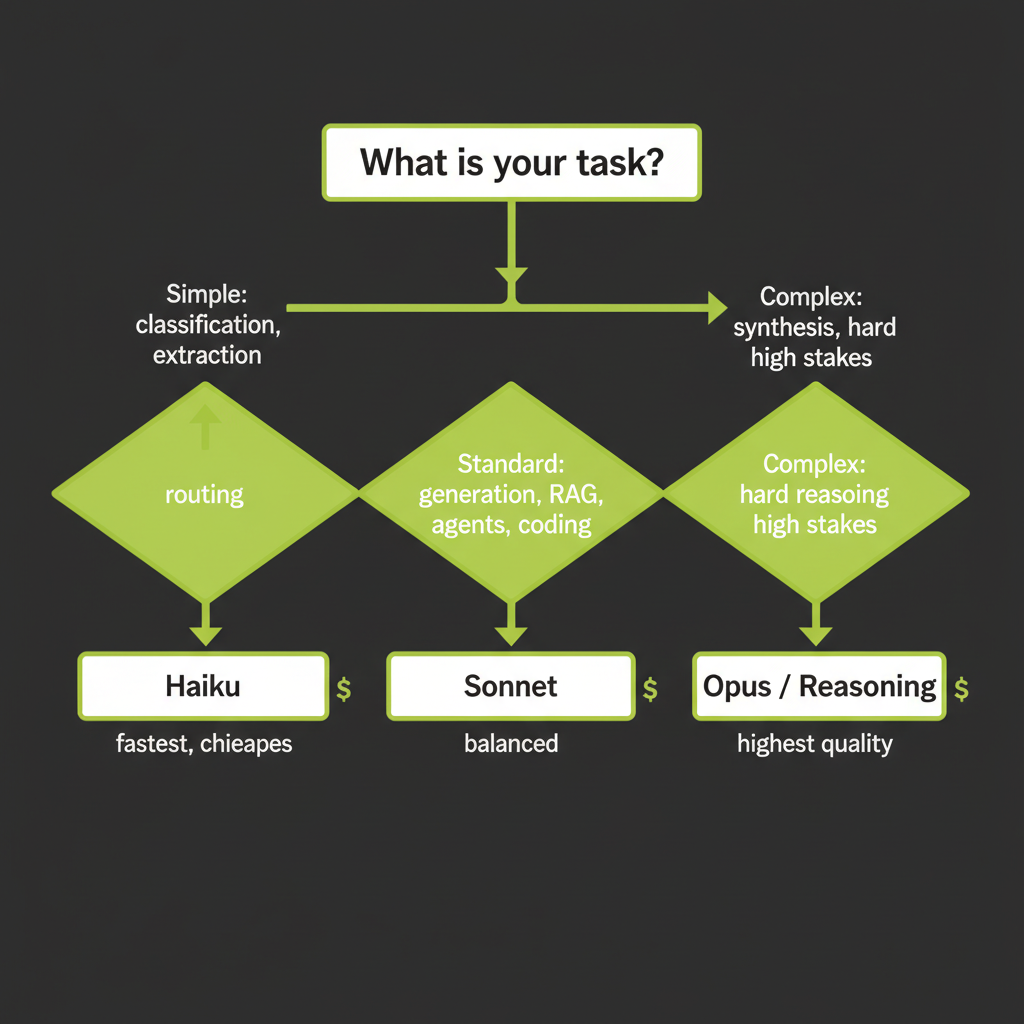
Anthropic offers three model tiers that trade off speed, cost, and capability. Choosing the right tier for each task is one of the highest-leverage decisions you make as an AI engineer:
Tier     | Speed    | Cost      | Best For
Haiku    | Fastest  | Cheapest  | Routing, classification, simple extraction, high-volume tasks
Sonnet   | Balanced | Mid-range | Standard generation, RAG, agents, most production features
Opus     | Slowest  | Premium   | Complex reasoning, synthesis, high-stakes decisions, nuanced analysis
Rule of thumb: match model capability to task complexity
The most common mistake is using Opus for everything. This is like renting a crane to hang a picture frame. A concrete framework:
- Use Haiku when the task has a clear, simple answer. Classifying a support ticket into one of five categories does not require Opus-level reasoning. Haiku handles it at 60x lower cost.
- Use Sonnet when the task requires nuance but follows predictable patterns. RAG-based Q&A, agent tool selection, code generation with moderate complexity — Sonnet handles all of these well and is the workhorse for most production applications.
- Use Opus or reasoning models when the task involves genuine synthesis, multi-step reasoning, or high-stakes decisions where errors are costly. Legal document analysis, architectural code review, research synthesis — these justify the premium.
The cascade pattern
Production systems often use multiple tiers in a cascade: a fast, cheap model handles the first pass, and only routes complex cases to a more capable (and expensive) model:
async function handleQuery(query: string): Promise<string> {
  // Step 1: Classify with Haiku (fast, cheap)
  const classification = await client.messages.create({
    model: "claude-haiku-4-0",
    max_tokens: 64,
    messages: [{ role: "user", content: `Classify as simple or complex: "${query}"` }],
  });

  const isComplex = classification.content[0].type === "text"
    && classification.content[0].text.includes("complex");

  // Step 2: Route to appropriate tier
  const model = isComplex ? "claude-sonnet-4-6" : "claude-haiku-4-0";
  const response = await client.messages.create({
    model,
    max_tokens: 1024,
    messages: [{ role: "user", content: query }],
  });

  return response.content[0].type === "text" ? response.content[0].text : "";
}
Evaluating LLM Output
Why intuition alone is unreliable for evaluation
When you read an LLM response, your judgment is influenced by fluency, length, and confidence — none of which correlate with accuracy. A confidently wrong answer feels better than a hedged correct one. This is why systematic evaluation is essential: you need structured criteria, not vibes.
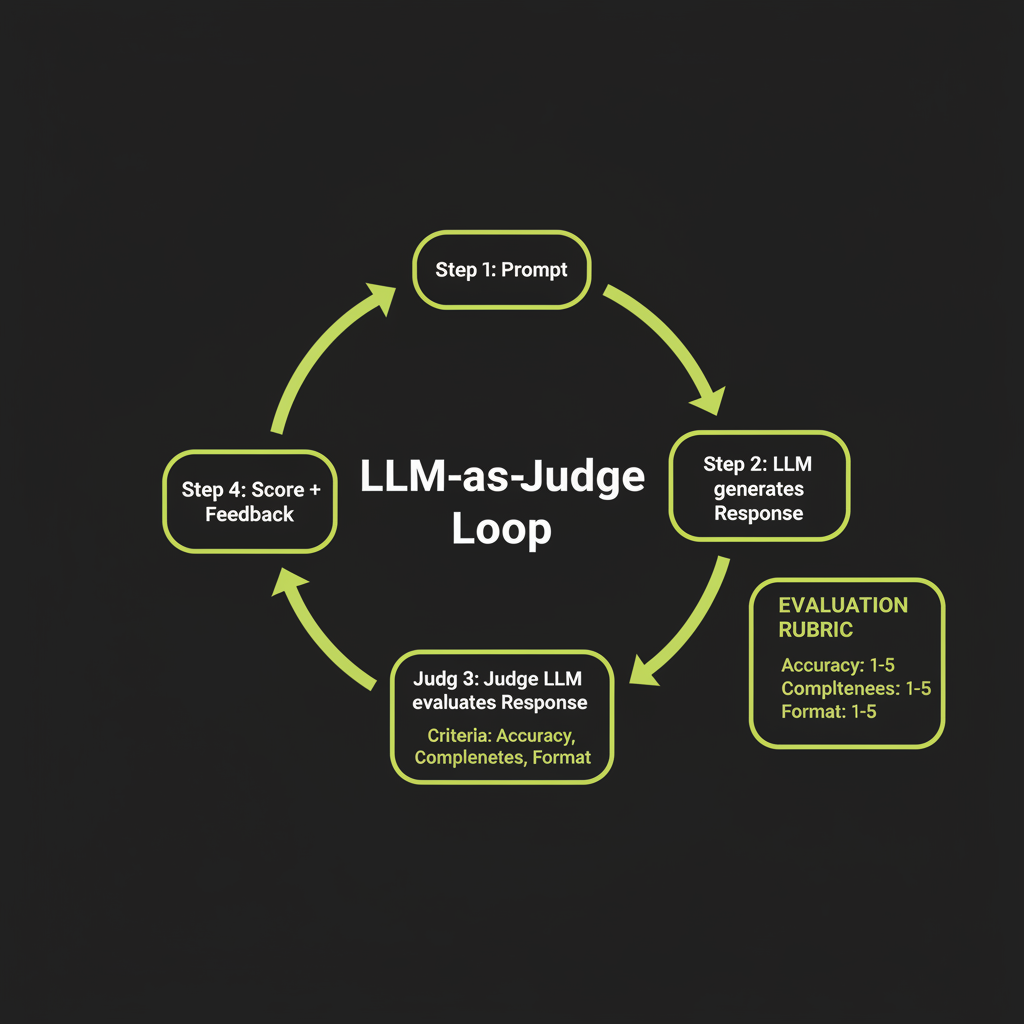
LLM-as-Judge: structured evaluation using Claude to rate Claude
The LLM-as-Judge pattern uses a model to evaluate another model's output against explicit criteria. This scales far better than human evaluation while maintaining reasonable quality:
async function evaluateResponse(
  question: string,
  response: string
): Promise<{ accuracy: number; helpfulness: number; clarity: number; reasoning: string }> {
  const evaluation = await client.messages.create({
    model: "claude-sonnet-4-6",
    max_tokens: 512,
    messages: [{
      role: "user",
      content: `Rate this response on a scale of 1-5 for each criterion.

<question>${question}</question>
<response>${response}</response>

Criteria:
- Accuracy: Is the information correct and complete?
- Helpfulness: Does the response address what was asked?
- Clarity: Is the response well-organized and easy to understand?

Respond in JSON: { "accuracy": N, "helpfulness": N, "clarity": N, "reasoning": "..." }`
    }],
  });

  return JSON.parse(
    evaluation.content[0].type === "text" ? evaluation.content[0].text : "{}"
  );
}LLM-as-Judge has known biases: it tends to prefer verbose responses, favors its own style, and can miss subtle factual errors. Use it as a scalable screening tool, not as the final word. For high-stakes evaluation, combine LLM-as-Judge with human review on a sample.
Benchmark awareness: what MMLU and HumanEval measure
Public benchmarks like MMLU (broad knowledge across 57 subjects), HumanEval (code generation), and GSM8K (math word problems) give you a rough comparison between models. But they have significant limitations:
- Contamination: Models may have seen benchmark questions during training, inflating scores.
- Narrow scope: A high MMLU score does not mean the model excels at your specific use case.
- Missing dimensions: Benchmarks rarely measure creativity, safety, or how well the model follows complex multi-step instructions.
The most trusted real-world benchmark is currently Chatbot Arena (LMSYS), which uses Elo ratings derived from human preference voting — users chat with two anonymous models and vote for the better one.
Building a simple custom eval set for your domain
The most reliable evaluation is one you build yourself. Start with 50–100 examples that represent your actual use case:
interface EvalExample {
  input: string;         // The prompt
  expectedOutput: string; // What a good response looks like
  criteria: string[];    // What to check: accuracy, format, tone
}

const evalSet: EvalExample[] = [
  {
    input: "What is your return policy?",
    expectedOutput: "We accept returns within 30 days of purchase...",
    criteria: ["mentions 30-day window", "includes refund method", "cites policy section"],
  },
  {
    input: "Can I return a sale item?",
    expectedOutput: "Sale items can be returned within 14 days...",
    criteria: ["mentions 14-day exception", "distinguishes from standard policy"],
  },
  // ... 48 more examples covering edge cases
];
Putting It Together: The Interactive LLM Playground
What you will build
The LLM Playground is your first hands-on project in this course. It is a web application where you can experiment with generation parameters in real time: slide temperature from 0 to 2, toggle top-p, compare the same prompt at different settings side-by-side, and see token counts update live.
This builds intuition that no amount of reading can replace. When you see temperature 1.5 produce incoherent output on a factual question, the lesson sticks.
Build this playground and keep it running. You will use it throughout the course to test prompts, compare model tiers, and develop the parameter intuition that distinguishes a senior AI engineer from someone who uses the defaults.
Architecture overview
The playground uses the same stack you will use throughout the course: a React frontend, Convex backend, and the Anthropic SDK for LLM calls. The key components are:
React UI
  ├── Model selector (Haiku / Sonnet / Opus)
  ├── Parameter sliders (temperature, top-p, max_tokens)
  ├── Prompt input area
  ├── Streaming response display
  └── Token count / cost estimate display

Convex Backend
  ├── Action: callClaude(model, params, prompt) → streamed response
  └── Token counting and cost calculation

Anthropic SDK
  └── client.messages.create() with streaming
Streaming responses with parameter labels
Streaming is essential for a good playground UX. Instead of waiting for the full response, tokens appear as they are generated:
import Anthropic from "@anthropic-ai/sdk";

const client = new Anthropic();

async function streamResponse(
  prompt: string,
  temperature: number,
  topP: number,
  model: string
) {
  const stream = client.messages.stream({
    model,
    max_tokens: 1024,
    temperature,
    top_p: topP,
    messages: [{ role: "user", content: prompt }],
  });

  for await (const event of stream) {
    if (
      event.type === "content_block_delta" &&
      event.delta.type === "text_delta"
    ) {
      process.stdout.write(event.delta.text);
    }
  }

  const finalMessage = await stream.finalMessage();
  console.log("\n\nTokens used:", finalMessage.usage);
}Run the same prompt at three different temperature settings and observe how the output changes. This builds the intuition you need for production parameter tuning.
- Choose a factual prompt — for example, "Explain what a database index is and when to use one."
- Run at temperature 0: Record the output. Note the tone, vocabulary, and structure.
- Run at temperature 0.7: Compare with the T=0 output. What changed? What stayed the same?
- Run at temperature 1.5: Note where the output diverges from being useful. At what point does creativity become noise?
- Form a hypothesis: What temperature would you set for a coding assistant? For a marketing copy generator? Write down your reasoning.
Use the LLM-as-Judge pattern to systematically evaluate three Claude responses generated with different parameter settings.
- Generate three responses to the same question using temperature 0, 0.7, and 1.2.
- Write an evaluation prompt that rates each response on accuracy (1–5), helpfulness (1–5), and clarity (1–5).
- Run the evaluator against all three responses. Record the scores.
- Compare the LLM judge's ratings with your own assessment. Where does the judge agree with you? Where does it disagree? What biases do you notice?