Agent Fundamentals
An agent is just an LLM in a loop with tools — understand the loop before you build one.
What you'll learn
The Central Distinction
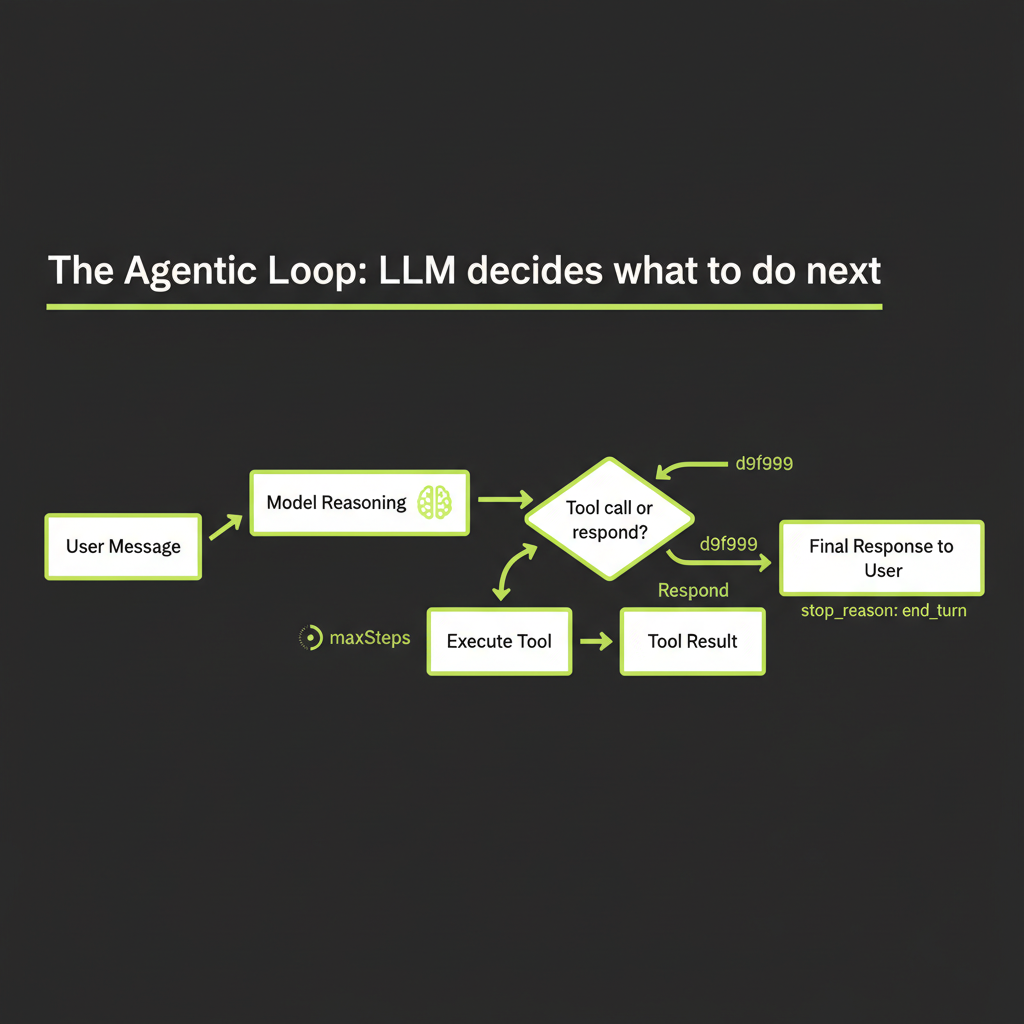
An agent is just an LLM in a loop with tools. The rest is engineering. This module gives you the mental model for understanding that loop before you write a single line of agent code.
"If your code decides what happens next, it's a workflow. If the model decides, it's an agent."
This is the most important distinction in the entire agents section of this course. It determines how you architect, test, debug, and operate every AI system you build. Let it sink in: the difference between a workflow and an agent is not about complexity, not about the number of tools, and not about whether you use a framework. It is about who controls the flow.
In a workflow, your code defines the exact sequence of steps. Step 1 always leads to step 2, which always leads to step 3. The LLM handles each step, but your code determines the order. The RAG pipeline you built in Module 4 is a workflow: retrieve documents, augment the prompt, generate a response. That sequence never changes.
In an agent, the model decides what happens next. You give it a goal and a set of tools. It looks at the situation, picks a tool (or chooses not to), observes the result, and decides the next action. The model controls the loop. You cannot predict at design time exactly which tools will be called, in what order, or how many times.
Direct call:    prompt --> LLM --> response
Workflow:       prompt --> LLM1 --> LLM2 --> LLM3 --> response  (you control the flow)
Agent:          prompt --> LLM --> [tool?] --> LLM --> [tool?] --> ... --> response  (model controls)
Why this distinction matters for reliability, debuggability, and cost
The "who decides" question has cascading consequences for every engineering concern you care about:
- Reliability: Workflows are deterministic at the flow level. You know exactly which steps will execute. Agents are non-deterministic at the flow level. The same input might trigger different tool sequences on different runs. This makes agents harder to test and harder to guarantee behavior.
- Debuggability: When a workflow produces bad output, you can inspect each step's input and output in sequence. When an agent produces bad output, you need to reconstruct the chain of decisions the model made — which tools it called, what it saw, why it chose to call another tool or stop.
- Cost: Workflows have predictable cost — N steps means N LLM calls. Agents have variable cost — the model might call one tool or ten, depending on the input. A user question that triggers a deep research chain could cost 10x what a simple question costs.
None of this means agents are bad. It means agents require more engineering discipline. The payoff is that agents can handle tasks that workflows cannot — tasks where the steps are not predictable in advance.
The Three Levels of Agency
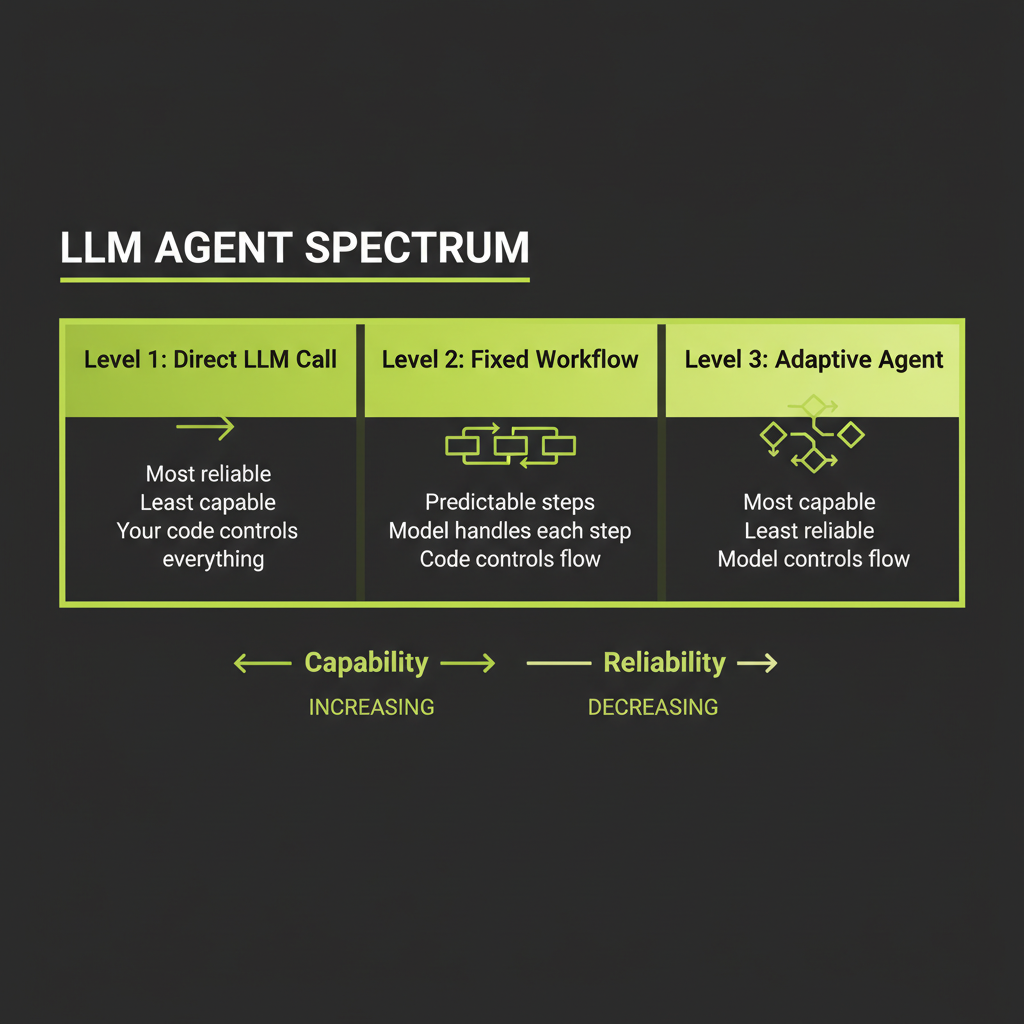
Level 1 — Direct LLM Call: single transformation, your code controls everything
The simplest level. You send a prompt, you get a response. No tools, no loops, no decisions. Your code controls everything. This is what you built in Module 1's playground.
Use a direct LLM call when the task is a single, well-defined transformation: summarize this text, translate this paragraph, classify this support ticket, extract entities from this email. One input, one output, no external data needed.
Direct calls are fast (one round-trip), cheap (one API call), predictable (same prompt structure produces consistent output shape), and easy to debug (inspect the prompt and the response). Most production AI features are direct LLM calls. Do not graduate beyond this level unless you have a clear reason.
Level 2 — Fixed Workflow (Prompt Chaining): predictable steps, model handles each step
A workflow chains multiple LLM calls in a sequence you define. The model handles each step, but your code determines the order and passes data between steps. You can add quality gates between steps — programmatic checks that validate output before proceeding.
Input --> LLM (draft outline) --> Gate (has 3-5 sections?) --> LLM (expand sections) --> Gate (word count OK?) --> LLM (edit for tone) --> OutputUse a workflow when the steps are predictable and sequential: generate an outline then expand it, summarize then translate, extract data then validate it. You know at design time what the steps are. The only question is what the model produces at each step.
Workflows give you control points. If step 2 produces garbage, you catch it at the gate before step 3 runs. This is much harder with an agent, where you cannot anticipate the exact sequence of operations.
Level 3 — Adaptive Agent: model decides which tools to call and when
The model receives a goal, a set of tools, and a system prompt that defines its behavior. It decides which tools to call, in what order, and when to stop. Each iteration of the loop — receive input, reason, act, observe, decide — is a step. The model runs until it determines it has enough information to respond, or until it hits a maximum step limit.
Use an agent when the number and type of steps varies by input. "What's the weather in Tokyo?" might require one tool call. "Plan me a 3-day trip to Tokyo considering weather, budget, and local events" might require five searches, two page reads, and a calculation. The model needs to adapt its approach based on what it finds.
The tradeoff: higher agency = more capability + more failure surface
Each level of agency increases what the system can handle, but also increases what can go wrong. A direct call can only fail at the prompt/response level. A workflow can fail at any step or gate. An agent can fail at any tool call, any decision point, or by making a bad sequence of decisions that wastes tokens and time.
The engineering principle: use the minimum level of agency that meets your requirements. Most developers over-engineer by reaching for agents when a workflow or direct call would suffice.
The Agentic Loop
Every agent, regardless of framework, implements the same core loop. Understanding this loop is essential before you use any agent framework, because the framework is just an implementation of this pattern.
Agent receives user message
The loop begins when a user sends a message. This message, combined with the system prompt and any conversation history, forms the initial context the model works with.
Model reasons about what's needed
The model reads the context and decides what to do. It might determine it can answer directly from its training data. Or it might determine it needs external information — in which case it will call a tool.
Model calls a tool (or responds)
If the model decides to use a tool, it generates a structured tool_use response containing the tool name and arguments as JSON. The model does not execute the tool — it requests that your application execute it. This is a critical distinction: the model produces a structured intent, and your code acts on it.
{
  "type": "tool_use",
  "id": "toolu_01abc123",
  "name": "search_web",
  "input": { "query": "Tokyo weather forecast March 2026" }
}
Tool result returned to model
Your application executes the tool (makes the API call, queries the database, performs the calculation) and sends the result back to the model as a tool_result content block. The model now has new information to work with.
Model decides: call another tool or respond?
This is the decision point that makes it an agent. The model evaluates the tool result and decides: do I have enough information to answer the user's question, or do I need to call another tool? If the search result was insufficient, it might search again with different terms. If the search returned a promising URL, it might call a URL reader tool. If it has all the data, it generates a natural language response.
Loop continues until stop_reason = end_turn
The loop repeats until the model returns a response with stop_reason: "end_turn" instead of stop_reason: "tool_use". At that point, the model has decided it is done gathering information and is ready to deliver its final answer.
let messages = [{ role: "user", content: userInput }];

while (true) {
  const response = await client.messages.create({
    model: "claude-sonnet-4-6",
    max_tokens: 1024,
    tools,
    messages,
  });

  messages.push({ role: "assistant", content: response.content });

  if (response.stop_reason === "end_turn") {
    break; // Model is done -- return the response
  }

  // Execute each tool call and collect results
  const toolResults = [];
  for (const block of response.content) {
    if (block.type === "tool_use") {
      const result = await executeTool(block.name, block.input);
      toolResults.push({
        type: "tool_result",
        tool_use_id: block.id,
        content: JSON.stringify(result),
      });
    }
  }

  messages.push({ role: "user", content: toolResults });
}
maxSteps: why you need a ceiling on iterations
Without a limit, an agent could loop indefinitely — searching, reading, searching again, never satisfied with what it finds. The maxSteps parameter (or equivalent) sets a hard ceiling on iterations. When the agent hits this limit, it must respond with whatever information it has gathered so far.
Typical values: 3–5 steps for simple research agents, 10–15 steps for complex multi-tool workflows, 25+ for coding agents that need to iterate. Start low and increase only when you observe the agent genuinely needing more steps to complete tasks. A high maxSteps is not "more capable" — it is "more expensive and more likely to go off track."
The Decision Framework
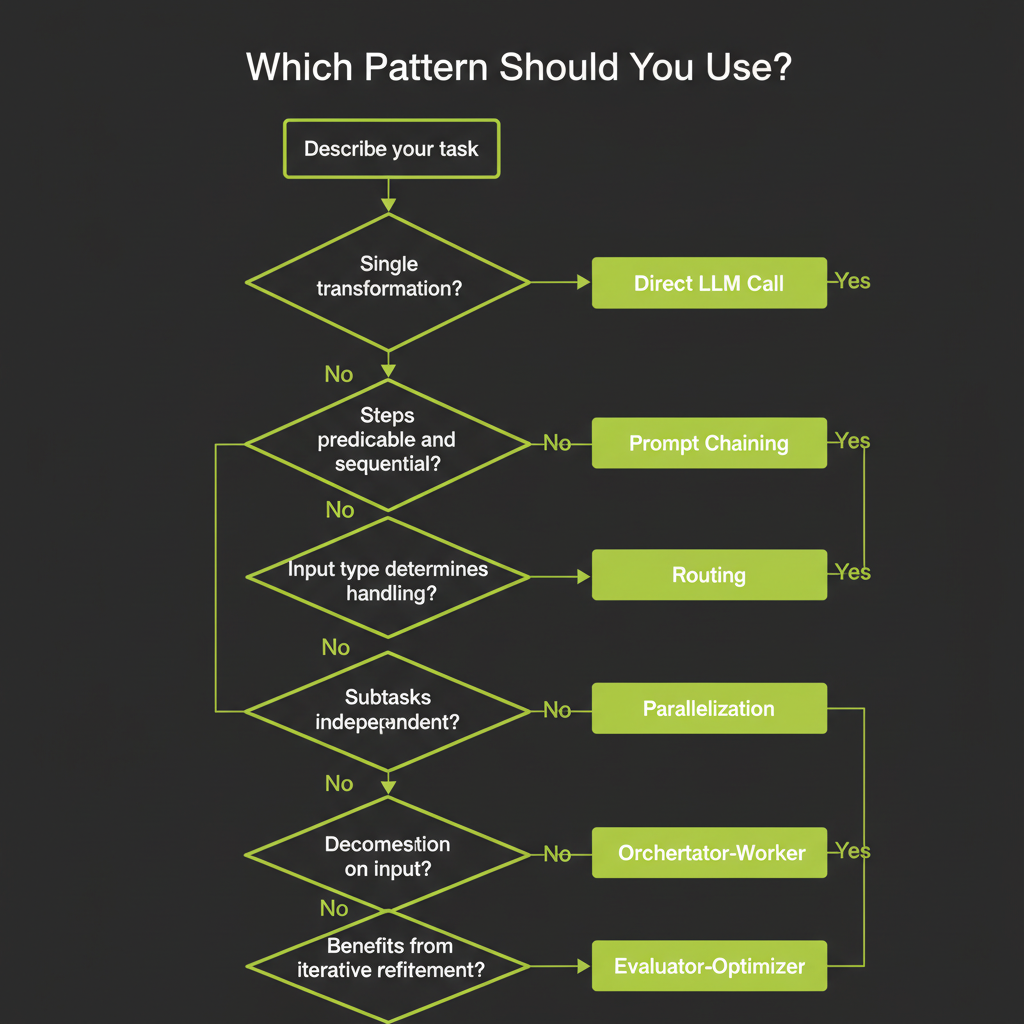
When you face a new task, this framework helps you choose the right approach without defaulting to "build an agent." Walk through these questions in order:
Single, well-defined transformation → Direct LLM call
"Summarize this article." "Translate this to Spanish." "Classify this email as spam or not spam." If the task is a single input-to-output transformation with no external data needed, a direct call is the right choice. Do not add tools or loops. Do not pass Go.
Steps predictable and sequential → Prompt Chaining
"Generate an outline, then expand each section, then edit for tone." You know the steps at design time. Chain them with quality gates between each step. The model handles each step; your code controls the sequence.
Input type determines handling strategy → Routing
"If it's a billing question, route to the billing handler. If it's a technical question, route to the tech handler." Classify the input first, then route to a specialized handler. Each handler can have its own system prompt, tools, and even model.
Subtasks can run independently → Parallelization
"Run security review, performance review, and style review on this code simultaneously." If the subtasks are independent, run them in parallel and merge the results. This is faster than sequential processing and each subtask can be simpler.
Task decomposition depends on input → Orchestrator-Worker
"Refactor this codebase." You cannot predict which files need changes until you analyze the code. An orchestrator agent reads the input, decides what subtasks to create, assigns them to worker agents, and synthesizes the results.
Task benefits from iterative refinement → Evaluator-Optimizer
"Write a function that passes these unit tests." Generate a solution, evaluate it, revise based on feedback, repeat. This pattern is powerful when you have clear success criteria and the task benefits from iteration.
Start with the simplest approach that meets requirements. Add agency only when simpler patterns fall short. A well-prompted LLM with two tools often beats a complex multi-agent system. Most production AI features are direct calls or simple workflows.
Failure Modes in Agentic Systems
Understanding failure modes before you build agents is more valuable than understanding success patterns. These are the ways agents break in production.
Hallucinated tool calls: model calls a tool that doesn't exist
The model might generate a tool_use block referencing a tool name that is not in your tools array. This happens when the model's training data includes tool-calling examples with different tool names, or when the model infers a tool should exist based on context. Your application must validate that the requested tool exists before attempting to execute it — and return a clear error message so the model can try a different approach.
Infinite loops: agent keeps calling tools without converging
The agent searches for information, finds it insufficient, searches again with slightly different terms, finds similar results, searches again. Without maxSteps, this loop never terminates. Even with maxSteps, a high limit can lead to expensive, time-consuming runs that produce no better result than a lower limit would have.
Mitigation: set reasonable maxSteps, and design your system prompt to instruct the model to respond with what it has when it cannot find better information after 2–3 attempts.
Tool result misinterpretation: model draws wrong conclusions from tool output
A search returns results about "Java" the programming language, but the user asked about "Java" the island. The model uses the wrong results to construct a confident but incorrect answer. This is a form of hallucination amplified by the agent architecture — the model has "evidence" from its tool call, which makes its wrong answer feel more authoritative.
Mitigation: return structured, unambiguous tool results. Include metadata that helps the model evaluate relevance. Design tool descriptions that guide the model toward precise queries.
Context window overflow: long agentic conversations exceed limits
Each iteration of the agentic loop adds messages to the conversation: the tool call, the tool result, the model's reasoning. After enough iterations, the accumulated context exceeds the model's context window. Earlier information gets truncated, which can cause the model to "forget" earlier tool results or even the original user question.
Mitigation: keep tool results concise (summarize rather than dumping raw data), use context compaction strategies (summarize earlier conversation turns), and set maxSteps to prevent runaway conversation growth.
Mitigation patterns: maxSteps, stop conditions, structured tool output
The three most effective mitigations are:
- maxSteps: Hard ceiling on loop iterations. Non-negotiable for production agents.
- Stop conditions in the system prompt: Instruct the model to respond when it has "good enough" information rather than seeking perfection.
- Structured tool output: Return JSON with clear fields rather than raw text. This reduces misinterpretation and makes tool results easier for the model to process.
More agency = more failure surface. Always test agents on adversarial inputs — ambiguous questions, nonsensical queries, requests that require tools you have not provided. The agent's behavior on edge cases reveals whether your architecture is robust or fragile.
Agents vs Workflows — Common Misconceptions
"Agents are always better" — false
Workflows are more reliable for predictable tasks. If you know the steps at design time, a workflow with quality gates will produce more consistent results than an agent, at lower cost, with easier debugging. Agents win only when the task requires adaptive behavior.
"Agents are just LLMs with tools" — incomplete
An LLM with tools but no architecture is not a useful agent. A production agent needs planning (how does the model decide what to do?), memory (how does it track what it has already done?), and evaluation (how does it know when it has a good answer?). The tool-use loop is the skeleton; the architecture is the muscle.
The misconception addressed: architecture = planning + memory + evaluation
When someone says "I built an agent," ask three questions: How does it plan its approach to a new task? How does it remember what it has already tried? How does it evaluate whether its answer is good enough? If the answer to any of these is "it doesn't," what they built is an LLM with tools, not an agent. The next three modules will teach you how to build the architecture that turns an LLM with tools into a capable agent.
Claude Code is a production agent built on this exact pattern. Its core is a while loop: send messages and tools to Claude, execute any tool calls, add results to messages, repeat until done. Every pattern in this module — maxSteps, tool validation, context management — is a pattern Claude Code uses with 80K+ GitHub stars.